Wadiz Story AI Review Guide | Number of Revisions and Deadlines
Updated: September 14, 2026
Wadiz Details Page
AI Review Guide
"Can't you change the story if you finish 10 AI screenings?" This is the question that makers ask the most. But there's one premise wrong with this question. The number of AI screenings for Wadiz is not one, but two.
5 times before submission and 10 times after opening are different times. If you add Wadiz's regular monitoring, the situation becomes three. If you separate the three, it becomes clear how many times I can use them now and how long I have to fix them.
You'll find out when you read this
- How AI Screening Proceeds
- What can be fixed after opening and what does not reflect
- How to reflect after requesting correction
Wadiz's detail page. It's judged in two ways
Wadiz is reviewing/monitoring the story based on the guidelines for advertising review.
|
Sortation
|
① AI screening before opening
|
② Monitoring After Open
|
|
Who
|
Maker requests from Maker Studio | Wadiz is checking at all times |
|
number of times
|
Up to 5 times | No restrictions |
|
Maximum Revision Deadline
|
None. | 2 business days |
|
Goal
|
Find expressions to get caught in advance | Request for correction of violation expression |
① Before Project Open: AI Review
AI screening before submission is optional. However, if you open it without being reviewed, you may receive requests that must be revised within two business days, so it is recommended that you undergo a review before opening the project.
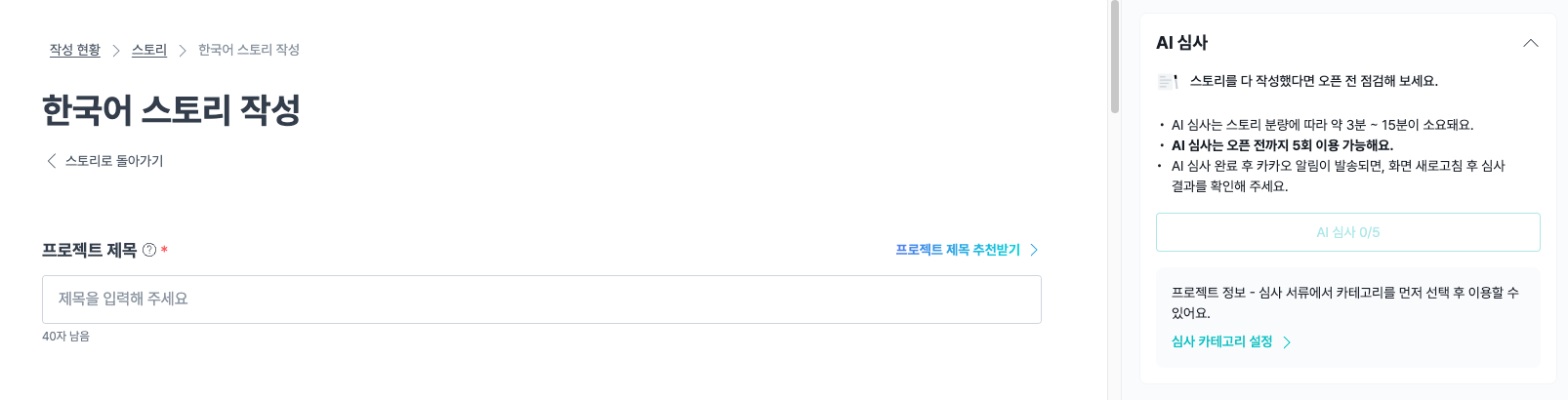
1. Ready: Select Category
Put your story in the Maker Studio [Story Creation] tab, and select a category from Project Information → Review Document. The criteria applied vary depending on the category, so be sure to select a category and get an accurate review.
2. Request: Click the right toolbar [AI Review] button
Press the [AI Review] button on the toolbar on the right side of the screen. You can use it up to five times before opening, so it's good to share it like this.
|
an episode
|
When
|
What do you check
|
| the first round | Application for review immediately after writing the first draft of the story | Get a full picture of what type is getting stuck |
| 2nd or 3rd episode | After correcting all the points in the first round, apply for review | Determine if the fixed expression passes and if there are any new modifications |
| the fourth round | Apply for examination after fixing the words in the image | Identify text and image violation expressions |
| 5th round | Application for examination just before submission | Last check |
3. Check the results
The AI screening takes about 3 to 15 minutes, and I'll let you know via Kakao Talk after it's completed. Please correct the wording shown in the review results and request the review again if necessary!
② After Project Open: Monitoring
Wadiz is automatically reviewed by AI even after opening. In particular, we carefully examine the following four items and inform the maker separately if it needs to be modified.
- False advertising and false patents or certifications
- Brand impersonation or not
- External Platform Redundancy
- Including policy violations in the story, etc
What if I get a revision guide?
- When I receive a notification, I check the feedback at [Maker Studio] → [Project Writing] → [Story Writing].
- I'll fix it myself in the Story Creation tab within 2 business days.
- If you save it, it will be immediately reflected in the project you are live on.
*After opening the project, if you want to modify the detail page?
On the Maker Studio [Story] tab, you can modify it yourself up to 10 times with an AI review request. Here's how to do it.
- After modifying the story, click the [AI Review] button to proceed with the automatic review.
- Once the review is completed, we will inform you of the results via Kakao Talk notification.
- If you click the [reflect] button in the subsequent results, it will be applied to the detail page. The parts that can be fixed at this stage are as follows.
Project title
Representative image
an introductory video and an introductory photo
Project Summary
Project Story
Story to be opened (However, it cannot be modified while the project is open)
Tags for Search
- Reinforcing content, adding content, modifying design for readability, and simple typos to explain the project you wrote in more detail will not be reflected even if you apply for revision.
- It also does not reflect expressions that violate the Wadiz screening criteria or related laws.
- Please check here for other items that can be modified through the application.
*Take advantage of the news!
Please write the contents you want to know, such as event information or 100% achievement thank you, as new news, not story modification. Even if the main information of the product is changed and the supporter must know, it can be left as new news apart from the modification and sent as an alarm to the supporter who participated in the funding and notification application.
AI Review, How to Create a Story That Passes Fast
The part that AI screening requests for revision the most is 'sentence that concludes claims without grounds'. If you prepare the exact number and evidence together, you can reduce the hassle of having to modify it due to AI screening.
① If you want to write numbers, prepare evidence together
To use specific numbers such as 'twice faster' and '99% blocking', you need to have data to support this, such as test results or test results. If you don't have data, it's better to subtract the numbers and express them in a different way.
❌ Insufficient evidence → Reduce waste discharge time by up to 2 times
If you have ✅ data, → ○○ As a result of the test by the Korea Testing Laboratory, the discharge time was reduced from △△ minutes to △△ minutes compared to before use. [+Add test number and certificate]
If you don't have ✅ data, → The most frequently mentioned change by those who used it was 'less swollen in the morning'.
② Use 'first' and 'unique' to the extent that you can prove it
The standard is whether you can objectively prove the expressions 'first' or 'only'.
If it's hard to prove, it's safe to narrow it down or only write confirmed facts. If it's ambiguous to judge for yourself, check it out in advance through AI screening before submission!
③ Check story essentials
You can save time by carefully checking and submitting essential items that must go into the Wadiz detail page in advance.
| a funding project | Preorder Project |
|
|
*Each category has different screening criteria!
Categories with separate labeling and advertising standards, such as food, cosmetics, and electronics, are particularly closely examined by AI. If you select a category accurately in the [Review Document], you can get an AI review based on the criteria for that category.
What if you're not a maker yet? Making My Project
Frequently Asked Questions
Q. Can't I fix the story if I finish 10 AI screenings?
A. There are two different times, so you have to look at them separately. Before submission, AI screening is 5 times, and after opening, direct modification is 10 times, and count separately. Even if you use all five times before submitting, you can freely modify the story itself. If you wrote all 10 times after opening, you have to send a request for correction by registering your inquiry.
Q. Do I have to fix the story that is scheduled to open as well?
A. Yes. Monitoring feedback should be reflected in both the main funding story and the expected opening story. However, if I fix it because I want it, I can't modify the story scheduled to open if the project is open.
Q. I'd like to fix a typo.
A. Simple typos will not be reflected even if you apply for modification. If it is an error that greatly changes the meaning, please explain the situation by registering an inquiry.
Q. Is there a way to do self-inspection before being reviewed?
A. Show the story to WAi and ask if there are any expressions that could get caught. In particular, if you check "what materials are needed to write this number" for each sentence with numbers, you can prepare while saving the screening session.